Certificate type
Electrical Installation Certificate (EIC) software
BS 7671:2018+A4:2026
The EIC is the primary certificate for new electrical installations, certifying that the design, construction, inspection and testing work satisfies the requirements of BS 7671. It must be issued whenever a new installation is put into service or an existing installation is significantly altered. CertSync lays the certificate out to the IET model form’s section structure, in its own original design.
What is an Electrical Installation Certificate (EIC)?
An Electrical Installation Certificate (EIC) is the BS 7671 document that certifies a new electrical installation — or a significant alteration to an existing one — has been designed, constructed, inspected and tested to the standard. It records the installation details, the test results for every circuit, and the declarations of the people responsible for the work.
Key features
- Multi-distribution-board schedules — record each board independently within one certificate
- Three-phase supplies — assign each circuit to L1, L2, L3 or across phases, and confirm phase sequence for each board
- Solar PV and battery storage sections — built into the EIC wizard, no workaround required
- Live BS 7671:2018+A4:2026 checks — earth fault loop impedance, insulation resistance and fault current against breaking capacity are checked as you enter them, and every failing reading is flagged before you issue; missing items and conflicts always block
- Digital signatures — one signature in solo mode, or a separate signature per declaration; the certificate locks once signed
- Cross-certificate memory — start a certificate for an existing customer and their contact details and address fill in from their last certificate; test results are never copied
How is the certificate printed, sent and checked?
- Every option on the form is printed, with your answer ticked, so the reader sees what was chosen and what was not.
- The footer reads "Prepared using CertSync", and the certificate states that the contractor named on it is responsible for its contents.
- Print a QR sticker for the installation. Scanning it opens a public verification page that asks for the property postcode and keeps the customer’s personal details hidden.
- Email the signed PDF to your customer from the app. Sending needs a connection.
The issued certificate
See a real Electrical Installation Certificate (EIC)
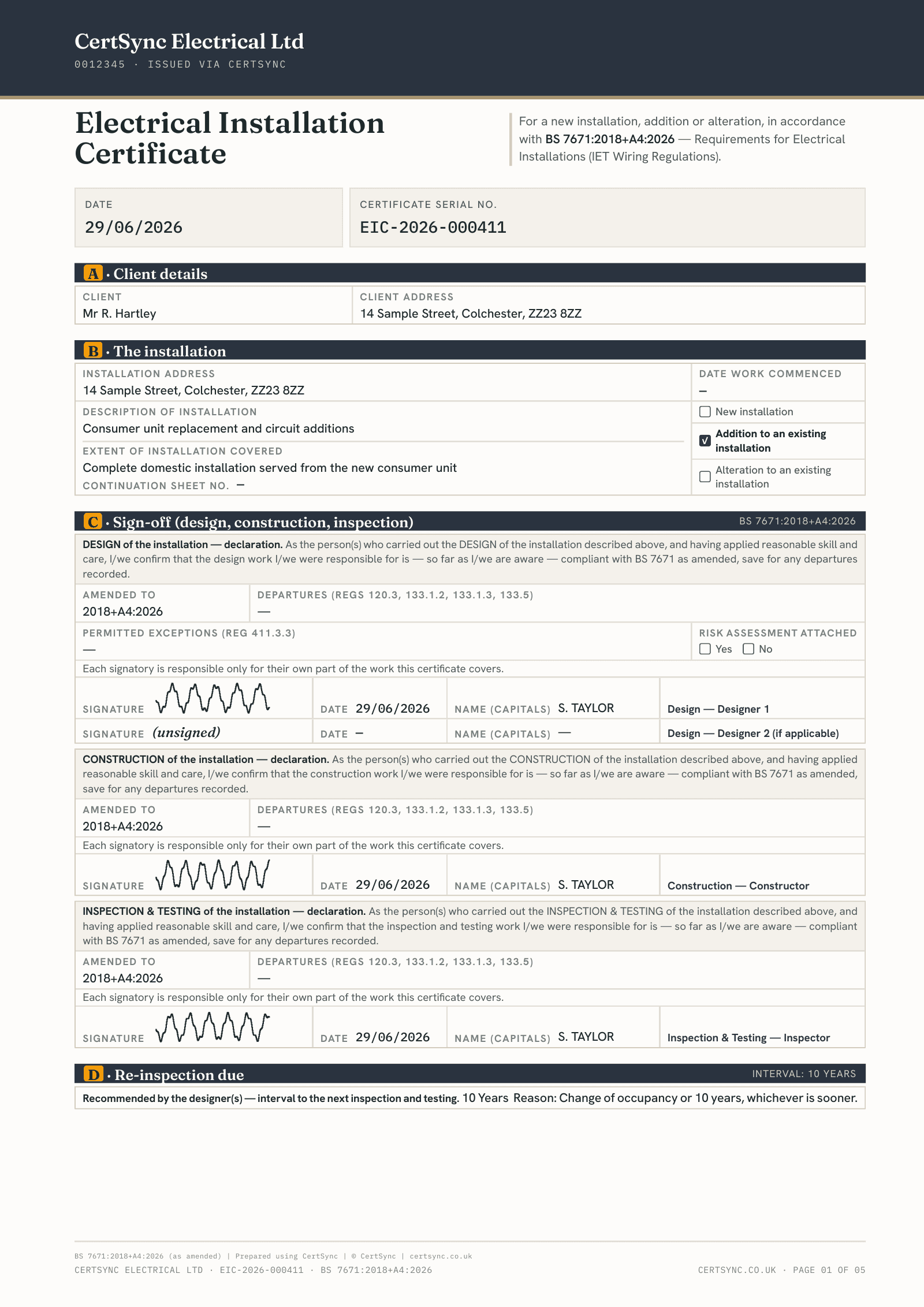
What this certificate includes
- Separate design, construction and inspection and testing declarations, each with its own signatory, address and signature, plus room for a second designer.
- Solo mode for when one person did all three parts: enter your details once and they fill every declaration. Supervisors and admins start in solo mode; installers start with separate declarations.
- Each declaration records the BS 7671 amendment the work was carried out to, and the certificate cannot be issued until one is declared.
- Departures from BS 7671 and permitted exceptions are recorded in their own boxes and printed on the certificate, along with whether a risk assessment is attached.
- The extent of the installation covered by the certificate, the type of work (new, addition or alteration) and the date work started.
- Supply characteristics and earthing: all six earthing arrangements on the current model form, external earth fault loop impedance, prospective fault current, maximum demand, means of earthing, the earthing and main bonding conductors, and the main switch with its RCD details where it has one.
- As many distribution boards as the job needs, each with its own location, supply source, surge protection and circuit schedule, all inside one certificate.
- Three-phase supplies, with each circuit assigned to a single phase or across phases.
- Circuit readings are checked as you enter them: earth fault loop impedance against the limit for the protective device, insulation resistance against the minimum, and fault current against the device’s breaking capacity.
- CertSync flags every failing reading before you issue. Missing core test results, a Zs above its maximum and a polarity failure on the schedule always block it.
- A schedule of inspections, the test instruments used (filled in from your saved kit) and a separate signed line for the person who carried out the tests.
- Optional sections for solar PV, battery storage and an EV charger on the same certificate, each opened with a tick-box.
- Comments on the existing installation, a recommended interval to the next inspection, and site photos printed on their own pages at the end of the PDF.
- Once signed, the certificate cannot be edited. You can start an EICR draft from it later, with the installation, boards and circuits carried across, and print a QR sticker for the board that links to its verification page.
- Once the certificate is issued, CertSync records when its re-inspection falls due, lists it in the Renewals due panel on your dashboard and emails you 90, 30 and 7 days before that date.
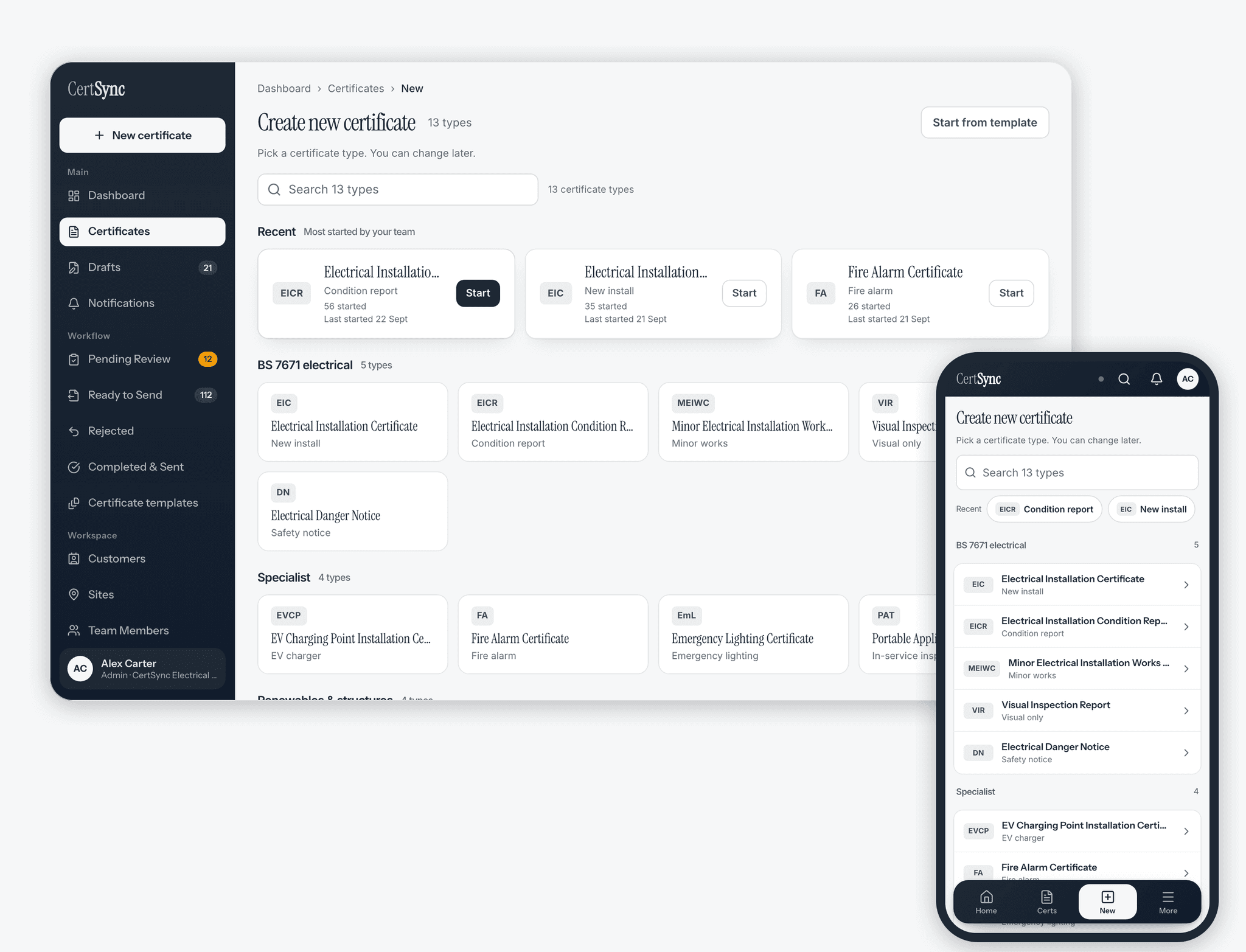
Domestic, commercial and industrial use
Domestic use
Domestic EICs cover everything from a rewire of a single dwelling to new builds with multiple distribution boards. CertSync supports Solar PV and battery storage sections for the growing number of residential installations that include generation or storage equipment.
Commercial use
Commercial EICs for offices, retail units and mixed-use premises often involve three-phase supplies and multiple distribution boards. CertSync handles multi-board schedules, allowing the responsible person to record each board's circuits independently within a single certificate.
Industrial use
Industrial installations — factories, plant rooms, warehouses — typically involve higher-capacity supplies, specialist protective devices and complex earthing arrangements. CertSync's EIC supports the full range of earthing systems — TN-S, TN-C-S (PME), TN-C-S (PNB), TN-C, TT and IT, the six the A4:2026 model form prints — and the device types required in these environments.
Validation as you enter results
Built-in BS 7671 validation flags out-of-range values as you enter test results, with the relevant regulation reference. It assists the competent person and does not replace professional judgement.
How to issue an EIC
Issuing an Electrical Installation Certificate follows the same path whether the job is a single circuit or a full installation.
- Engage a competent electricianA competent electrician or electrical contractor carries out the design, construction and verification of the new installation work.
- Inspect and test the installationThe installation is inspected and tested in line with BS 7671, recording the results for each circuit.
- Record the certificate detailsEnter the installation details, supply characteristics and circuit test results. Earth fault loop impedance, insulation resistance and fault current against breaking capacity are checked as you type. CertSync flags every failing reading before you issue, and missing items and conflicts always block it.
- Sign the declarationsThe persons responsible for the design, construction and inspection and testing sign their declarations on the certificate.
- Issue and retainThe signed EIC is issued to the client or building owner and retained as evidence the installation is safe to put into service.
How to complete an EIC in CertSync
The EIC wizard follows the order you work on site, from the client and the declarations through the supply and the schedules to the circuits. These are the steps as they appear in the sidebar.
- Client & Installation DetailsCheck the issue date (it defaults to today), add an optional reference and job number, then enter the client and the installation address. Under Installation Type, tick every kind of work the certificate covers (New Installation, An Addition, An Alteration), and describe the Extent of installation covered by this Certificate. Both are needed before the certificate can be issued.
- Design, Construction & InspectionComplete the three declarations: Design (with an optional second designer), Construction, and Inspection & Testing. Each records the organisation, registration details, the BS 7671 amendment level, any departures, and the name, date and signature. Add a Qualified Supervisor if one applies. Where one person is responsible for all three, use the Single signatory (responsible for all) card instead.
- Supply & OriginWork from the supply to the board in order: The supply (earthing system and live conductors), Cut-out, Main switch, Measure at the origin (supply polarity), Earthing & bonding (main earth and main bonding), Demand & meter tails, and Other sources such as solar PV or a battery.
- Schedule of InspectionsRecord the outcome of each inspection item. Once you have checked the items you did not individually mark, CertSync offers to mark the unanswered ones as satisfactory in one go. Add Comments on the existing installation (useful when the work is an addition or alteration) and the Next inspection details.
- Test InstrumentsEnter the serial or asset number of each tester you used (multi-function, continuity, insulation resistance, earth fault loop, RCD, earth electrode), then who carried out the tests, with their signature and date. Leave a tester blank if you did not use it.
- Circuit DetailsAdd each distribution board (Add distribution board) and complete its Identity, Main switch, Checks at the board and Supply at the board sections. Then add the circuits on that board: identification, protective device, conductor sizing, and the test results (continuity, insulation resistance, polarity, earth fault loop impedance, RCD). Each board has its own circuit schedule inside the one certificate. Earth fault loop impedance, insulation resistance and fault current against breaking capacity are checked as you enter them.
- Photos & Supporting DocumentsAttach photos and any supporting documents. They print with the certificate.
- Review & SubmitCheck the Inspection summary and the Signature status. If the work needs notifying, tick Building control: this flags the certificate for your supervisor or administrator and CertSync does not submit the notification for you. Then submit for review.
Describe the extent covered precisely. A certificate that does not say which part of the installation it covers is hard to rely on, and the wizard will not let you issue without it.
Frequently asked questions
- When is an EIC required?
- An EIC is required for every new electrical installation, for the provision of any new circuit, for a consumer-unit replacement, and for significant alterations to an existing installation. Where the work is confined to an existing circuit — an extra socket-outlet or lighting point, a replacement fitting — a Minor Electrical Installation Works Certificate (MEIWC) is the appropriate document instead.
- How many signatures does an EIC need?
- The EIC carries three declarations: design, construction, and inspection and testing. Where different people did each part, each signs their own. Where one person did all three, they can complete all three declarations in solo mode and sign once. CertSync offers both, and a supervisor or admin starts in solo mode by default.
- Can I produce an EIC for a job with more than one distribution board?
- Yes. CertSync allows you to add as many distribution boards as the installation requires. Each board has its own circuit schedule. All boards are contained within the same certificate document, so a single EIC covers the complete installation regardless of how many boards are present.
- What is the difference between an EIC and an EICR?
- An EIC certifies new work — it is issued when an installation, or a significant alteration to one, is completed. An EICR (Electrical Installation Condition Report) assesses the condition of an existing installation at a point in time and assigns a Satisfactory or Unsatisfactory outcome. You issue an EIC once at completion; you commission an EICR periodically thereafter.
- Does an EIC cover Solar PV and battery storage?
- Yes. The growing number of installations that include generation or storage equipment can be certified on the same EIC. CertSync builds Solar PV and battery storage sections into the EIC wizard, so the generation and storage parts of the installation are recorded alongside the conventional circuits in a single certificate.
- How long should an EIC be kept?
- An EIC should be retained for the life of the installation — it is the primary evidence the installation was certified as compliant when put into service, and is often requested at sale, letting or a future periodic inspection. CertSync keeps your certificates in secure cloud storage while your account is active, and for a 90-day read-only grace period if you cancel — export your own copies during that window, because the data is permanently deleted on day 91.
- How do I complete an EIC (Electrical Installation Certificate) in CertSync?
- The EIC wizard follows the order you work on site, from the client and the declarations through the supply and the schedules to the circuits. These are the steps as they appear in the sidebar. The steps are: Client & Installation Details; Design, Construction & Inspection; Supply & Origin; Schedule of Inspections; Test Instruments; Circuit Details; Photos & Supporting Documents; Review & Submit.
- Do I need to tell building control about an EIC?
- Whether work is notifiable under the building regulations is a judgement for you and your scheme, not something CertSync decides. The final step of the EIC wizard has a Building control tick: when you set it, the certificate is flagged for your supervisor or administrator to notify building control. CertSync does not submit the notification for you.
Related certificates and guides
Get started with CertSync
Start free — first month on us. All 13 certificate types, one subscription.
First month free, card required, then From £15/month. No fixed-term contract. Cancel any time.