Electrical certificate software: every feature
13 certificate types. Live BS 7671 circuit checking on EIC and EICR. Offline on site. Team review before anything reaches a client.
13 certificate types.
Every one of them on both plans.
- Electrical Installation CertificateNew installation work
- Electrical Installation Condition ReportPeriodic inspection
- Minor Electrical Installation Works CertificateWork on one existing circuit
- Visual Inspection ReportInspection without testing
- Electrical Danger NoticeImmediate danger found
- EV Charging Point Installation CertificateCharge point installs
- Solar PV Commissioning CertificateArray, strings and inverter
- Battery Storage (EESS) Commissioning CertificateBattery storage handover
- Fire Alarm CertificateBS 5839 detection systems
- Emergency Lighting CertificateBS 5266 escape lighting
- Portable Appliance TestingIn-service equipment
- Lightning Protection Test & Inspection ReportStructures, BS EN IEC 62305
- BS 7909 Temporary Electrical SystemsEvents and temporary supplies
Electrical work — EIC, EICRand MEIWC — all to BS 7671:2018+A4:2026. Danger Notices are a written warning record supporting duty-of-care obligations under the Electricity at Work Regulations 1989 and the Health and Safety at Work etc. Act 1974, rather than a BS 7671 certificate of compliance. The VIR follows BS 7671 principles but is not a BS 7671 model form: the standard issues none for a visual-only report, so a VIR supplements an EICR rather than replacing one. EVCP to the IET Code of Practice for Electric Vehicle Charging Equipment Installation, 5th edition. Emergency Lighting to BS 5266-1:2025. Fire Alarm covers domestic (BS 5839-6) and non-domestic (BS 5839-1:2025). PAT to the IET Code of Practice for In-service Inspection and Testing, 5th edition. Solar PV and Battery/EESS commissioning certificates cover generation and storage installs. Lightning Protection Test & Inspection Reports follow BS EN IEC 62305. BS 7909 covers temporary electrical systems at events. Fire Alarm includes the BS 5839-1 Annex G documents (G1 to G7) and the BS 5839-6 domestic certificate. Emergency Lighting has completion and periodic certificates.
And for multi-stage jobs, you get every document the work calls for — not just a single certificate. Fire alarm and emergency lighting produce the full set across design, installation, commissioning and inspection.
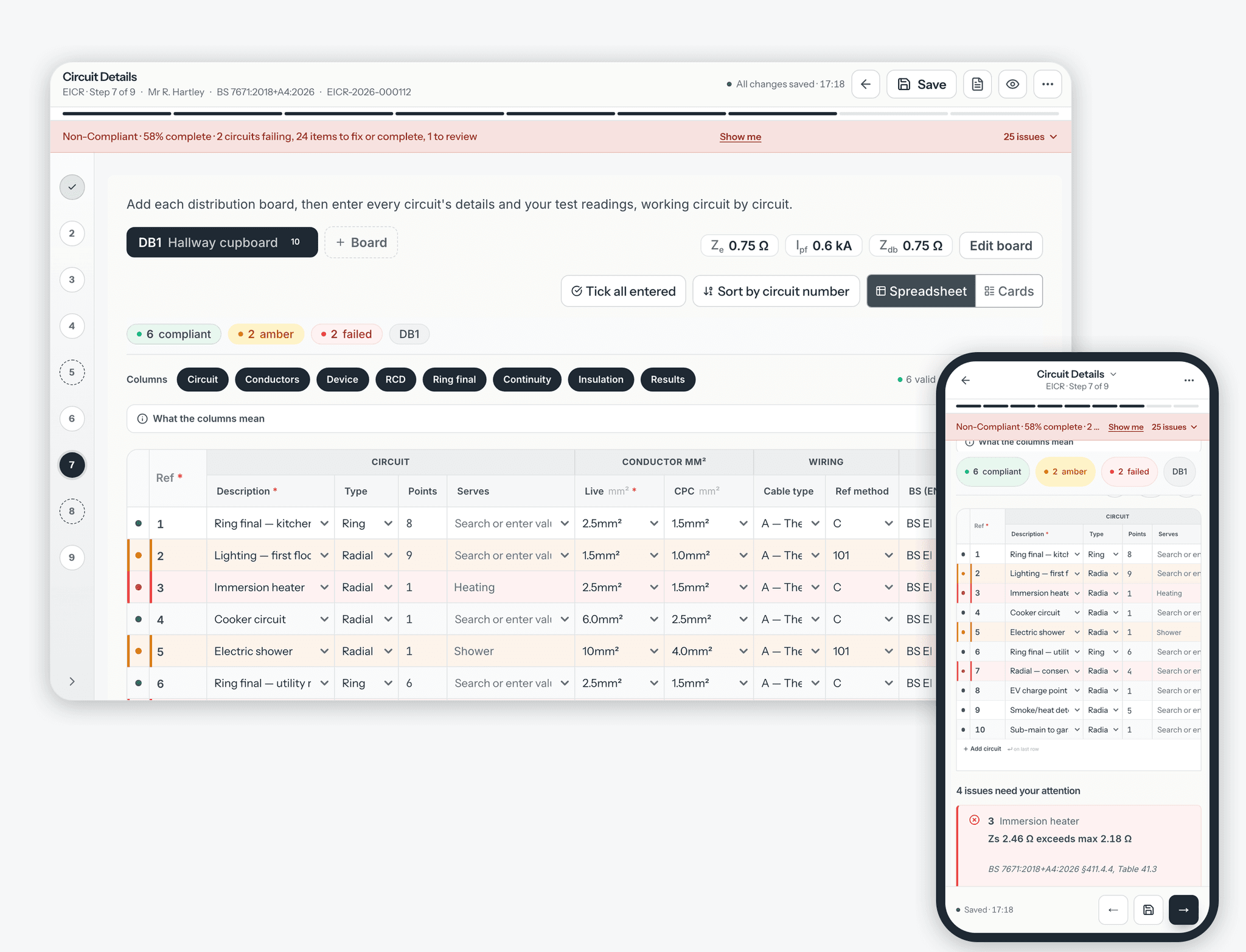
Catch the fail before you leave the field.
On EIC and EICR circuit schedules, CertSync checks your figures against BS 7671 as you type. Measured Zs above the maximum for that device? Insulation resistance, RCD trip or breaking capacity out of range? You see it straight away — a clear red/amber/green status on each circuit, plus a Needs-Attention list that points you at the relevant regulation. Observation codes — C1 (immediate danger seen), C2 (potentially dangerous), C3 (improvement recommended, no danger seen) and FI (further investigation needed) — are built into the EICR picker. Fix it on site, not after the client's chased you.
The Visual Inspection Report uses the same four observation codes, but records no test values at all — it is a visual-only document, so there is nothing for the circuit checks above to validate. Where a coded observation needs testing to resolve, the report recommends a full EICR and says how soon.
Validation assists the competent person; it does not replace professional judgement.
| # | Circuit | Device | Zs measured | Max Zs |
|---|---|---|---|---|
| 4 | Sockets ground floor | B32 | 0.98 Ω — within limit | 1.10 Ω |
| 5 | Lights first floor | B6 | 8.10 Ω — over limit | 5.82 Ω |
| 6 | Cooker | B32 | 0.71 Ω — within limit | 1.10 Ω |
PDFs, offline working, QR checks and corrections.
Signed PDFs with no DRAFT mark, emailed to your client.
Every type prints on a clean layout that follows the structure electricians expect, with every option on the form shown and your answer ticked. Digital signatures stamp the certificate with name, date and certification reference. Email it straight to your client. Attach photos to observations, and iPhone HEIC photos convert automatically.
See the PDF beside the form, or preview it on your phone.
On a laptop or desktop, switch on the preview and watch the finished PDF take shape beside the form as you fill it in. You do not need to generate, check, go back and regenerate. Spot a wrong field on the preview and fix it in the form. On a phone, preview the PDF any time.
Installations beyond a single consumer unit.
Multi-distribution-board installations. Three-phase supplies. Solar PV arrays. Battery storage. EV charger circuits inside an EIC. The form adapts without you juggling spreadsheets.
Works where the signal doesn't.
Create and fill in certificates with no signal. Up to 50 recent completed certificates and up to 50 drafts stay on your device, and drafts save as you type. Photos you take without a signal are stored encrypted on the device. When you reconnect, changes and photos sync in the background. Signing, approving and sending are completed once you are back on signal.
- Up to 50 recent completed certificates and 50 drafts on your device
- Open a signed certificate while online, then pin it to keep it on the device
- Drafts auto-save locally while you work
- Background sync as soon as you reconnect
Turn an EIC into an EICR, or an EICR into an EIC.
Open a signed EIC and start the periodic EICR from it, or open a signed EICR and start the EIC for the new work. Client, installation, supply, earthing and bonding, boards, circuits and recorded test results carry across. EICR observations and condition codes never do. The new certificate is always a draft you check, complete and sign yourself.
EIC vs EICRLet anyone check a certificate is genuine.
Print a QR sticker for a certificate at 29, 38 or 62 mm. Scanning the sticker opens a CertSync verification page. After the certificate is sent, anyone with the property postcode can see its details and test results. Before that, the page shows only its type and issuer. The customer’s personal details are never shown.
Correct a signed certificate without editing it.
A signed certificate is locked. If something on it needs correcting, issue a correction: CertSync starts a new certificate from it, and once that is signed it replaces the original. The verification page shows that the original has been replaced, and why.
Everything CertSync does, in one list.
Certificates
- 13 certificate types in one editor, on every plan
- Fire Alarm Annex G documents and BS 5839-6 domestic; Emergency Lighting completion and periodic
- Save a certificate as a template and start new ones from it
- Circuit templates for the circuits you fit again and again
- Copy an existing certificate to start a new one
- Turn a signed EIC into an EICR, or an EICR into an EIC
- Correct a signed certificate by issuing a replacement
- See a certificate's version history
- Every option on the form printed, with your answer ticked
- A "Prepared using CertSync" footer, with your company named as responsible for the certificate
Compliance and validation
- Live BS 7671 checks on EIC and EICR circuits as you type
- Red, amber or green on every circuit, plus a list of what needs attention
- Observation codes C1, C2, C3 and FI built in
- A shared observation library for wording your team uses again
- A building-control reminder list of notifiable jobs, ticked off by Supervisors and Admins once you have notified. CertSync does not submit the notification for you
- Re-inspection due dates, a Renewals due panel on the dashboard, and reminder emails 90, 30 and 7 days before a certificate's re-inspection falls due
Speed and workflow
- Customer and site details saved once and filled in on later certificates
- Smart Fill suggests the values you enter most, and you can review or clear what it remembers in Settings
- Live PDF preview beside the form on a laptop or desktop
- Photos on observations, with iPhone HEIC photos converted
- Search certificates and customers from the search box at the top of the app
- Download up to 50 certificates at a time as one ZIP file
Teams and collaboration
- Four roles: Installer, Supervisor, Office and Admin
- Installers submit, Supervisors approve and sign or return with comments
- Team editing with section locks and live updates, with a clear conflict message instead of an overwrite
- An audit log of submit, approve, sign, send, return, correct and delete actions
- Pay per seat; add or remove seats at any time
Offline and mobile
- Installs to your home screen from the browser
- Create and fill in certificates with no signal
- Up to 50 recent completed certificates and up to 50 drafts on your device
- Open a signed certificate while online, then pin it to keep it on the device
- Photos taken offline are queued and upload when you reconnect
- Signing, approving and sending are completed once you are back on signal
Sending and QR verification
- Email certificates to your customer, and resend them
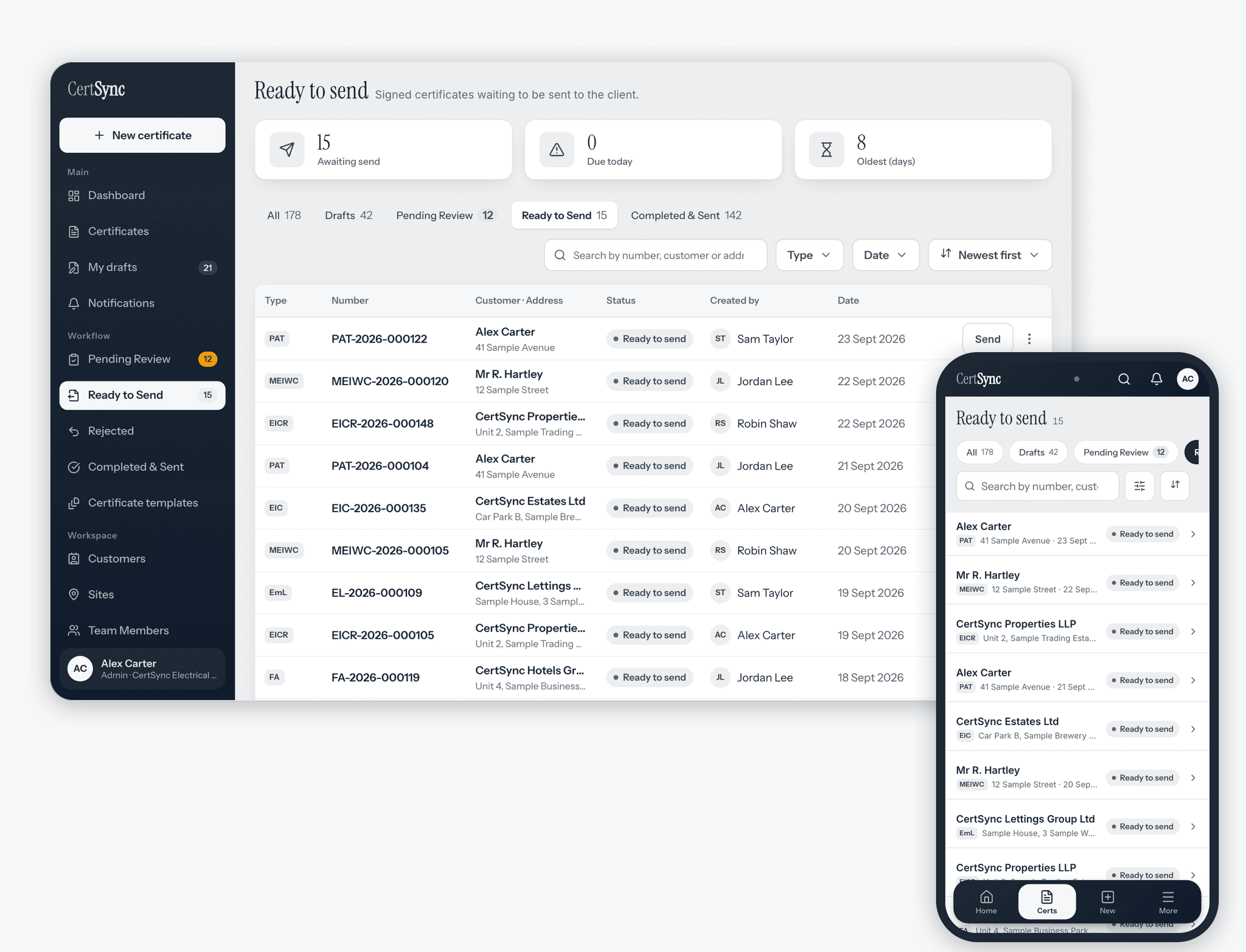
- Admins, Office seats and Supervisors with Office access can send
- QR stickers at 29, 38 or 62 mm
- A public verification page behind the property postcode, with no customer personal details
Security and data
- Passwords hashed, and sessions that expire after 7 days
- Multi-factor sign-in with a code sent by email
- Your data kept separate from every other company
- Export your data, and ask for it to be erased
- Kept while you subscribe, plus a 90-day read-only period after you cancel
Installer → Supervisor → Client.
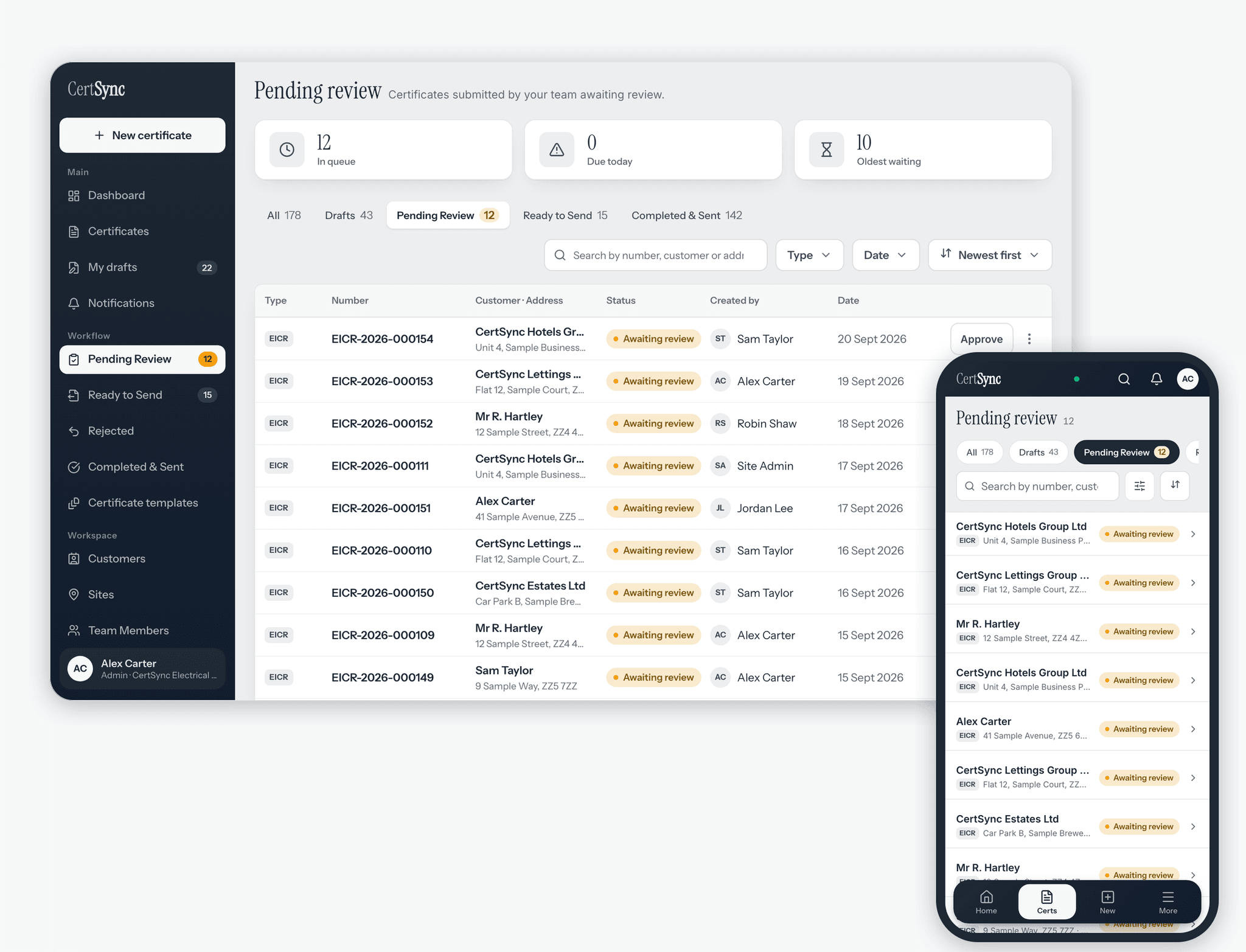
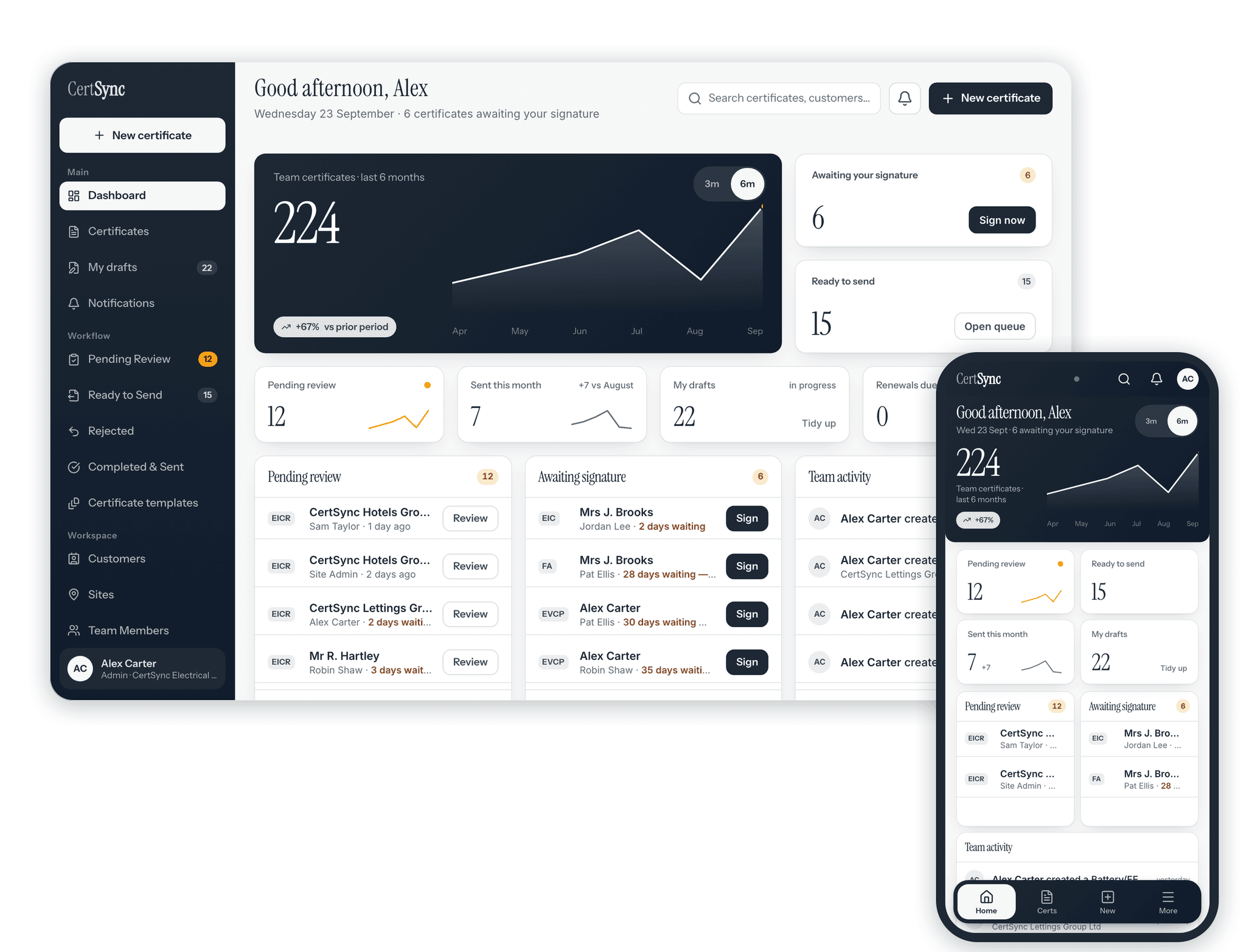
Invite a colleague into a live draft and work it together. See who's in the certificate and which section they're in, and section locking stops two people editing the same part at once. Edits to different parts are combined. If a save would overwrite a newer change a colleague has made, CertSync refuses it and shows you the conflict to resolve. Accept or decline invites from the notification bell. Installers submit for review; Supervisors review and either sign off or return with specific comments. Sending is a separate permission from signing: Admins, Office seats and Supervisors with Office access can email a finished certificate to a client. The dashboard is role-aware — each role sees only what they need to act on.
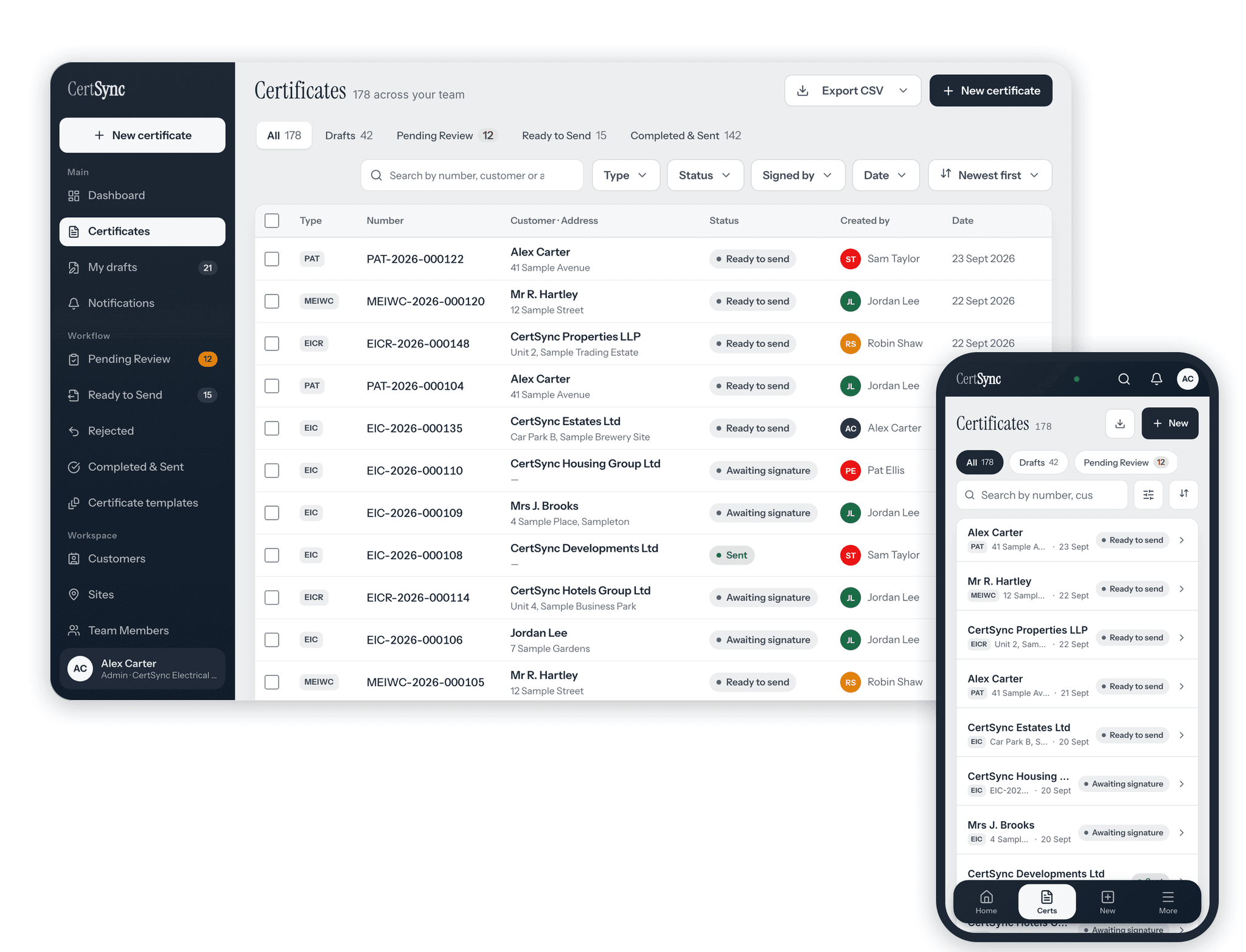
Certificates are grouped by site on the dashboard, so your team can find all the work at a property in one place. Customer detail pages keep a cross-certificate memory — past certs at the same address, contact details, and notes that carry over to new jobs automatically.
Can I install CertSync on my phone?
Yes. CertSync runs in any modern browser on Android, iPhone, iPad, Windows, Mac or Linux. On iPhone and Android, add it to your home screen as an icon, straight from the browser. There is no app store download. Generous touch targets for on-site use. Responsive from 360px up.
How is my data protected?
Passwords hashed (bcrypt). Sessions expire after 7 days. Brute-force attempts rate-limited and locked out. MFA backup recovery codes encrypted at rest with AES-256-GCM; all data encrypted at rest at the storage layer via MongoDB Atlas. Designed to support UK GDPR obligations: data export route, right to erase, Article 30 record of processing. Role-based security actions are recorded in an audit trail. Customer data scoped to company; cross-tenant access blocked at the data layer.
Every certificate type, unlimited creations, cloud storage for the duration of your active subscription with a 90-day grace period on cancellation, digital signing, bulk PDF export as a single ZIP. Team seats £5 per user for your 2nd–10th teammates, £3 each above that.
First month free · Card required · Cancel any time
Frequently asked questions.
What certificates can I create with CertSync?
All 13 UK electrical & renewables certificate types, on every plan. In detail: EIC, EICR and MEIWC (BS 7671:2018+A4:2026), the Danger Notice (a written warning record supporting duty-of-care obligations under the Electricity at Work Regulations 1989 and the Health and Safety at Work etc. Act 1974 — BS 7671 publishes no model form for it and it is not a certificate of compliance), the VIR (a visual-only report prepared to BS 7671 principles — BS 7671 issues no model form for a visual-only report, and a VIR does not satisfy a statutory inspection-and-test duty), EVCP (IET EV Code of Practice, 5th edition), Emergency Lighting (BS 5266-1:2025), Fire Alarm — domestic (BS 5839-6) and non-domestic (BS 5839-1:2025) — PAT (IET Code of Practice for In-service Inspection and Testing, 5th edition), Solar PV and Battery/EESS commissioning certificates, Lightning Protection Test & Inspection Reports (BS EN IEC 62305), and BS 7909 Temporary Electrical System certificates.
Which standards does CertSync support?
Electrical certificates (EIC, EICR and MEIWC) follow BS 7671:2018+A4:2026. The Danger Notice is a written warning record supporting duty-of-care obligations under the Electricity at Work Regulations 1989 and the Health and Safety at Work etc. Act 1974 — it is not a BS 7671 certificate, and BS 7671 publishes no model form for it. The VIR is prepared to BS 7671 principles but is not a BS 7671 model form — the standard issues none for a visual-only report — so it supplements an EICR rather than replacing one. EVCP follows the IET Code of Practice for Electric Vehicle Charging Equipment Installation, 5th edition. Emergency Lighting is to BS 5266-1:2025. Fire Alarm is to BS 5839-6 (domestic) and BS 5839-1:2025 (non-domestic). PAT follows the IET Code of Practice for In-service Inspection and Testing, 5th edition.
Does it work offline?
Yes. You can create and fill in certificates with no signal. Up to 50 recent completed certificates and up to 50 drafts stay on your device, and drafts save as you type. Photos taken without a signal are stored encrypted on the device. Everything syncs when you reconnect. Signing, approving and sending are completed once you are back on signal.
Do I need to download anything to use CertSync?
No. CertSync runs in any modern browser. On iPhone, iPad and Android you can add it to your home screen as an icon, straight from the browser. Visit certsync.co.uk and tap "Add to Home Screen".
Can customers check a certificate is genuine?
Yes. Print a QR sticker for the certificate. Once it has been sent, scanning the sticker opens a CertSync verification page. Anyone with the property postcode can see the certificate details and test results, and the customer’s personal details are never shown.
Can I correct a signed certificate?
Yes, by issuing a correction. A signed certificate is locked and cannot be edited. A correction starts a new certificate from it, and once that is signed it replaces the original. The verification page shows the original was replaced, and why.
Can I convert an EIC into an EICR?
Yes, in either direction. From a signed EIC you can start the EICR, and from a signed EICR you can start the EIC. Installation, supply, boards, circuits and recorded test results carry across; EICR observations do not. The new certificate is a draft you check, complete and sign.
Who can send certificates to customers?
Admins, Office seats, and Supervisors who have been given Office access. Installers draft and submit. A Supervisor approves and signs, and sends only if an Admin has switched Office access on.
How much does CertSync cost?
CertSync is From £15/month. Your first month is free. On CORE, £15 for the first user, £5 each for users 2–10, and £3 each from user 11.
Is my data secure?
Passwords hashed (bcrypt). Sessions expire after 7 days. Brute-force attempts rate-limited and locked out. MFA backup recovery codes encrypted at rest with AES-256-GCM; all data encrypted at rest at the storage layer via MongoDB Atlas. Designed to support UK GDPR obligations: data export route, right to erase, Article 30 record of processing. Role-based security actions are recorded in an audit trail. Customer data scoped to company; cross-tenant access blocked at the data layer.