One job, one customer, every site, and who is on each one.
A certificate records one piece of work. A project holds the whole job: every site, who is booked each day, and the certificates that belong to it. CertSync PRO runs all three together.
First month free. Cancel any time. From £15/month.
What a project is
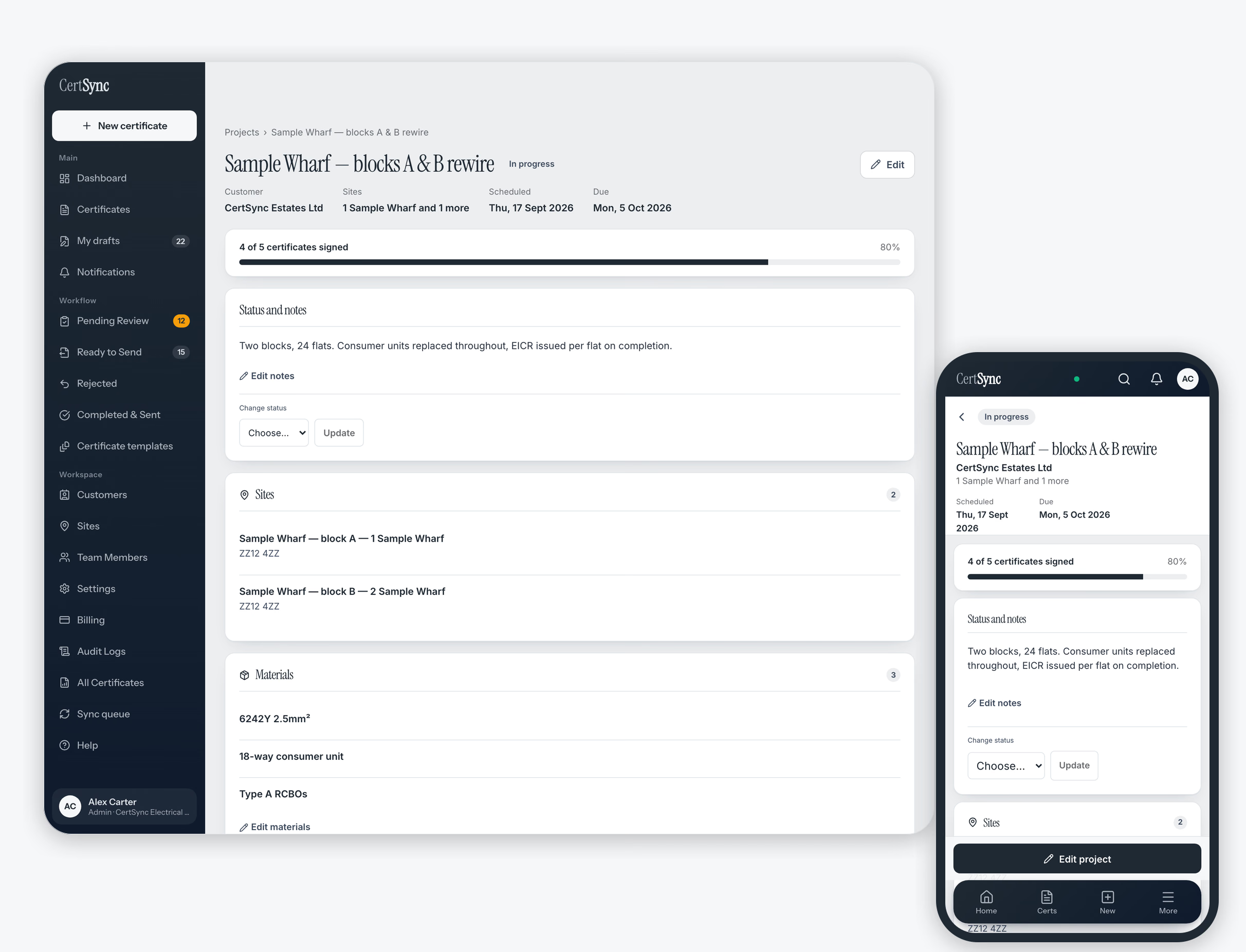
A project is a named job for one customer. It can cover one of that customer's sites or forty. It carries a status you move it through, and it only closes when somebody closes it. A materials list and notes stay with the job. You book people onto it a day at a time, and the schedule shows a week or a month so you can see who is on site which day. The person you book gets a notification. Your dashboard shows how far each job has got and which ones are running past their date. The certificates you write attach to the job they belong to: CertSync suggests a match, and you confirm it. Nothing is attached automatically.
- One project, one customer, as many sites as the job covers
- A status you move, and a close you make on purpose
- A materials list and notes that stay with the job
- Each person booked onto the days they are on site
- A week or month schedule of who is on which job
- A notification for each person you book onto a job or take off it
- Completion and overdue work on your dashboard
- Certificates suggested for the job, then attached when you confirm
Three parts of the same job
Job and project tracking
A named job for one customer that can cover one address or forty. It carries a status you move it through and close explicitly, so a finished job stops appearing as live work. Materials and notes sit on the job.
See job trackingTeam scheduling and calendar
Who is on site, which day. A week or month view of the whole team, with each person booked onto the days they are on site. Days off show on the schedule, and you get a warning if you book someone who is away.
See the scheduleCertificates linked to jobs
The certificates you already write in CertSync, attached to the job they belong to. The paperwork for a forty-plot development is one list rather than forty searches. Sending from the job is on that page.
See linked certificatesComparing tools before you choose one? Our page on electrical project management software sets out what to look for and how CertSync PRO answers each point.
A development is one project. Closing it is a decision.
A project belongs to one customer and covers as many of that customer's sites as the job does. Forty plots are still one piece of work: one name, one set of dates, one materials list, one place to look when somebody asks how it is going.
Status is something you move: scheduled, in progress, on hold, complete. A job is only complete because a person marked it complete. Paperwork does not close it. A quiet week does not close it. Closing is a state rather than a delete, so a job with outstanding work can be reopened, and one that never started can be cancelled without disappearing.
Who is on site, which day.
A name on a job tells you who owns it. The schedule tells you who is on site on Thursday, because staffing is a person and a date.
The calendar shows a week or a month of the whole team. Days someone is off are marked on the schedule, and you get a warning if you book them. Staff can request time off, and an admin or office user approves or rejects it. Anyone you book gets a notification. On a phone, the same day is a simple agenda for the person in the van. Your dashboard flags jobs that are running past their date, so the ones worth a call surface without opening every record.
Certificates attach to the work they belong to.
A certificate already records an address and a date. Attaching it to the project means you can ask what is outstanding on the job, not only what you issued in March. CertSync suggests a project when a certificate looks like it belongs to one; you confirm the link. Nothing is attached automatically.
Sending those certificates from the job is a separate action, with limits that belong on the page that describes it. Certificates linked to jobs covers how signed certificates leave, and what is shown to you first.
Office decisions stay with the office.
Admins, office staff and supervisors with Office access create, edit, close, reopen and cancel projects. Anyone booked onto a job can move its working status and add notes, but cannot create, close or cancel one. Staffing the diary stays with the people who run it: everyone else can see the job they are on without being able to move anybody around it.
The list and the schedule travel. Opening a job does not.
Your projects and the schedule are stored on your device, so with no signal you can still see the job and who is booked on it. Opening a particular job needs a connection. If one is already open when the signal drops, you can change its status or add notes, and both sync when you reconnect.
Reading is offline. Creating a project, changing its customer, sites or dates, and booking people onto days all need a signal.
What Projects does not do
Projects covers running the work and attaching its certificates. It does not raise invoices or quotes, and it does not connect to accounting software. It does not plan routes, estimate travel time, or produce timesheets or payroll. If you need invoicing or route planning today, Projects does not do it yet.
Priced per seat, on CertSync PRO.
Projects is part of CertSync PRO: £25 a month for the first seat. For a small firm the number that matters is the total: a five-person team is £57 a month, including every seat. Extra seats are £8 each for seats 2 to 10, and £5 each from seat 11. Team size is capped at 500 seats, and a seat is bought before it can be invited. From £15/month covers the entry plan if you only need certificates.
PRO keeps everything Core has (all 13 certificate types, unlimited certificates, your team and your settings) and adds the project layer on top. Nothing about the way you write certificates changes.
See pricing for what a team of your size costs, or start free.
CertSync is not currently VAT registered. The price you see is the total you pay.
Questions about running a job in CertSync
What is a project in CertSync?
A named job for one customer that can cover one address or forty. It carries a status, a start and due date, a materials list and notes, and it is the thing you schedule people onto. A development, a rewire programme or a maintenance round is one record rather than a pile of unconnected work.
Which plan includes Projects?
CertSync PRO. It has everything in Core, the certificate plan, and adds job tracking, the team schedule and certificates filed by job. Core stays the right plan if you only need certificates.
Do I need Projects to write certificates?
No. Every certificate type, signing, and emailing a signed certificate to a customer are in Core. Projects adds the job around the certificates; it changes nothing about how you write them.
Where should I start?
Create one project for a job you are running now, tick the sites it covers, and book the people who are on it this week. File the certificates under it as you write them. Job tracking, scheduling and linked certificates each have their own page in this section.
Does Projects raise invoices or plan routes?
No. Projects covers running the work and attaching its certificates. It does not raise invoices or quotes, connect to accounting software, plan routes, estimate travel time, or produce timesheets for payroll.
Run the job and its paperwork in one place.
First month free. Cancel any time. From £15/month.