Certificate type
Electrical Installation Condition Report (EICR) software
BS 7671:2018+A4:2026
The EICR is the standard document for periodic inspection and testing of existing electrical installations. It records the condition of the installation at the time of inspection, assigns an overall outcome (Satisfactory or Unsatisfactory) and documents any observations using a standard classification system. CertSync structures the report to the form that landlords, letting agents, building owners and compliance officers are accustomed to receiving.
What is an Electrical Installation Condition Report (EICR)?
An Electrical Installation Condition Report (EICR) is the document produced after a periodic inspection and test of an existing electrical installation. It records the condition of the installation, lists any defects using the C1, C2, C3 and FI classification codes, and gives an overall Satisfactory or Unsatisfactory outcome.
Key features
- C1, C2, C3 and FI observation codes, with a built-in observation library you can search as you type
- Photo evidence on any observation — attach images directly within the observation entry
- Overall outcome (Satisfactory / Unsatisfactory) is yours to set, and CertSync blocks Satisfactory while a C1 or C2 is recorded
- Next-due date worked out from the inspection date and the interval you choose, with the reason for the interval recorded
- Two signatures — the person who inspected and tested, and the person who reviewed and authorised the report
- Live BS 7671:2018+A4:2026 validation — test values checked against applicable limits
How is the certificate printed, sent and checked?
- Every option on the form is printed, with your answer ticked, so the reader sees what was chosen and what was not.
- The footer reads "Prepared using CertSync", and the certificate states that the contractor named on it is responsible for its contents.
- Print a QR sticker for the installation. Scanning it opens a public verification page that asks for the property postcode and keeps the customer’s personal details hidden.
- Email the signed PDF to your customer from the app. Sending needs a connection.
The issued certificate
See a real Electrical Installation Condition Report (EICR)
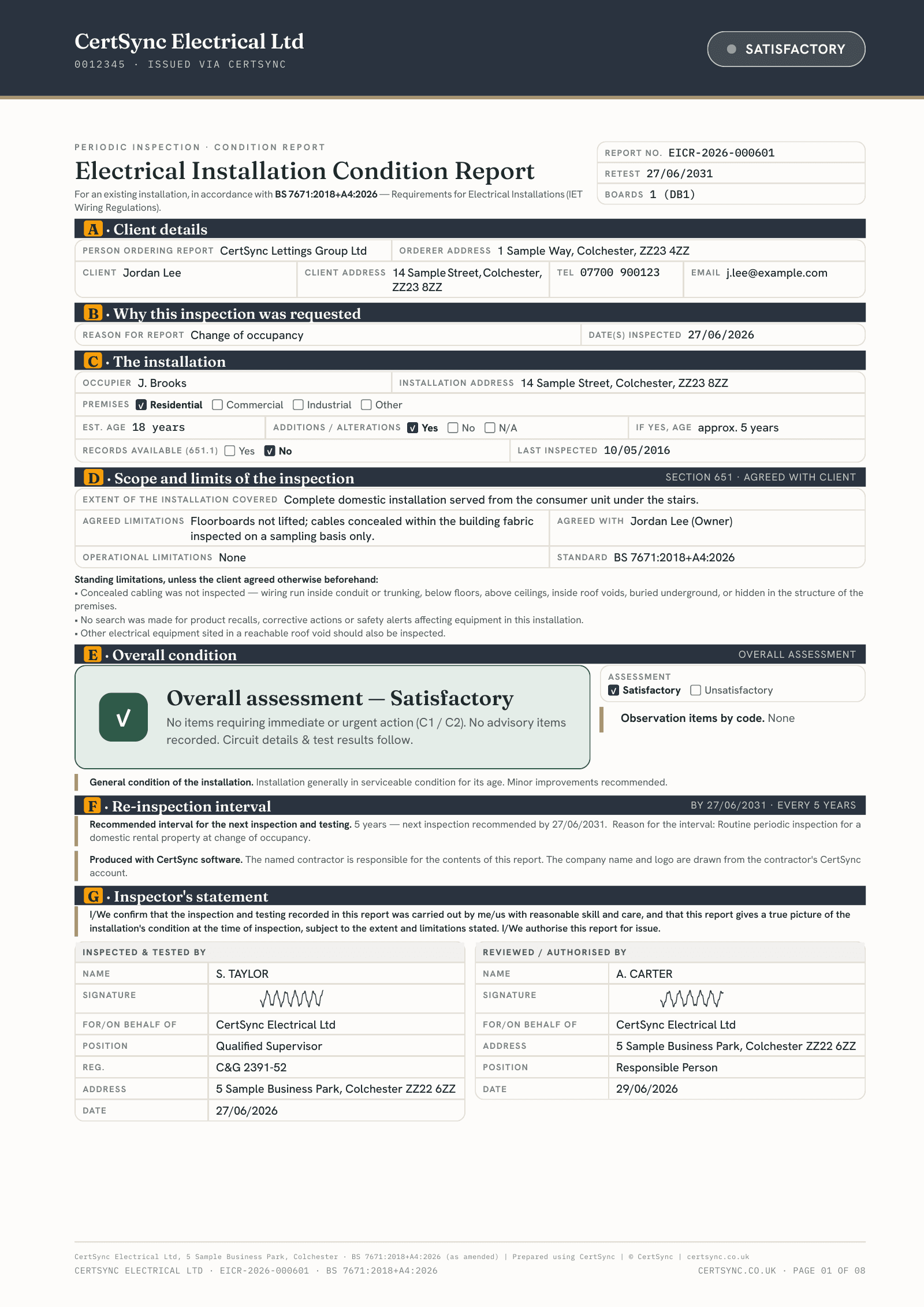
What this certificate includes
- Records why the report was asked for and the date or dates of the inspection and testing, including a survey that ran over more than one day.
- Before the report can be issued you must state the extent of the installation covered, the limitations agreed for the inspection, and the BS 7671 amendment the installation was assessed against.
- The schedule of inspections runs through eight sections, from the intake equipment to solar PV and battery storage. Every item needs an outcome before issue, and the special-locations and prosumer sections are hidden when they do not apply.
- Each observation has a description, a location, a regulation reference and a code: C1, C2, C3 or FI. A C1 or C2 must also say what remedial action is recommended.
- Observations can be picked from a built-in library grouped by part of the installation, or suggested as you type, alongside any entries your team has added.
- A C1 or C2 recorded against a schedule item must also be listed as an observation before the report can be issued. A C3 or FI that has not been carried across gets a warning.
- You set the overall assessment, Satisfactory or Unsatisfactory, and describe the general condition. A report with any C1 or C2 cannot be issued as Satisfactory; C3 and FI do not change it.
- When a C1 or C2 is recorded, the name of the person told about it and the date must be filled in before issue. Their signature can be captured but is never required.
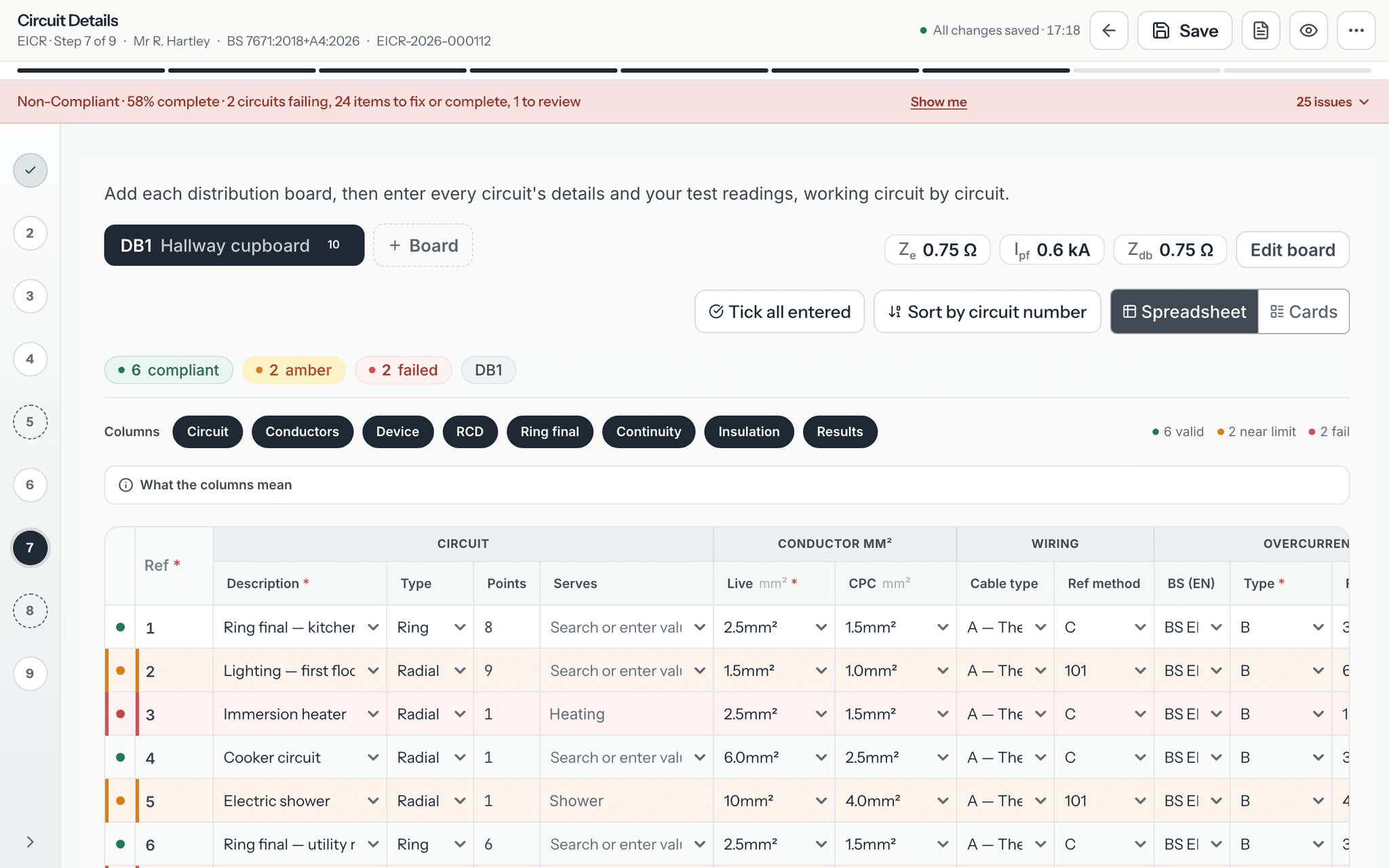
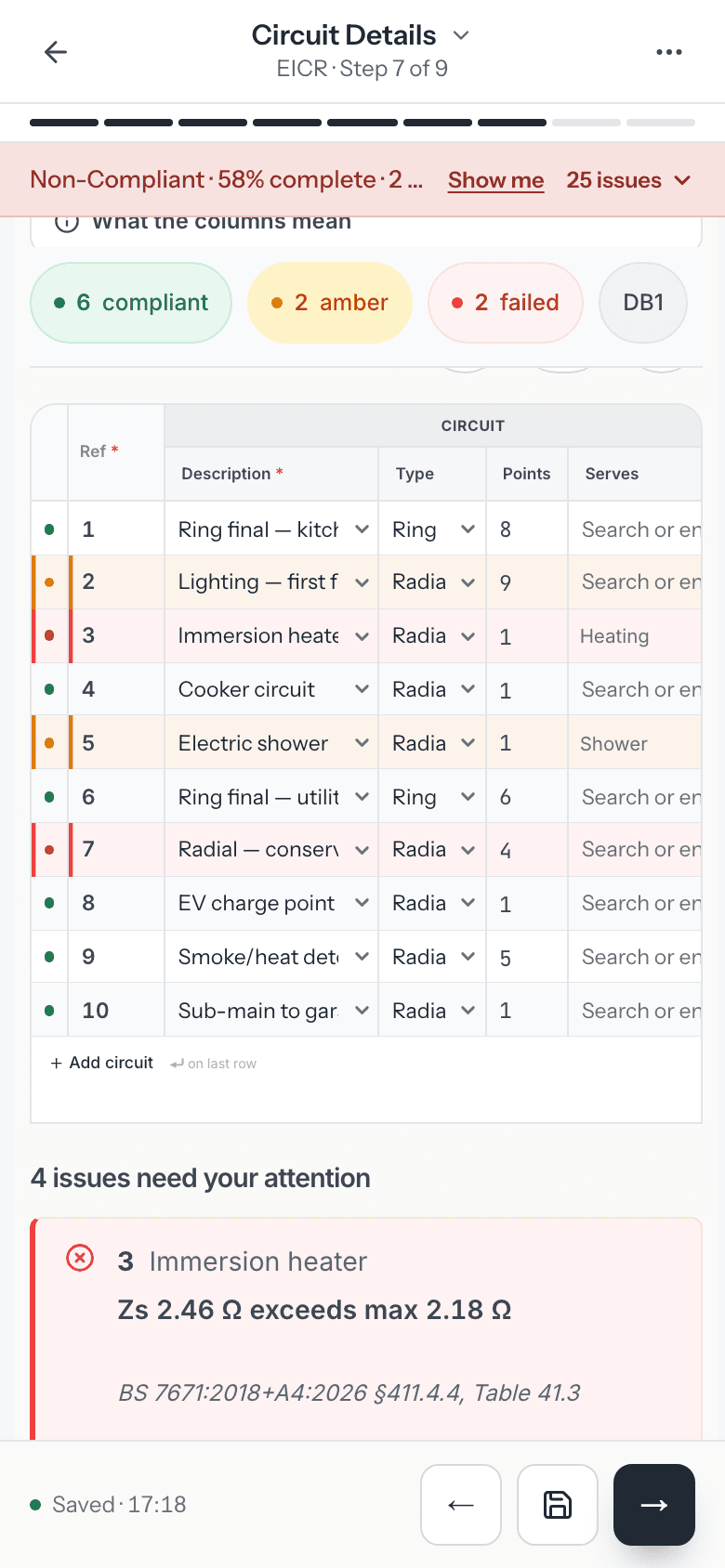
- Circuit readings on each board are checked against BS 7671 as you type. A failed circuit can be added to the observations in one step, with a suggested code you can change.
- You choose the interval to the next inspection and give the reason for it. The report prints the due date, worked out from the inspection date.
- The declaration has two signature panels: one for the person who inspected and tested, and one for the person who reviewed and authorised the report. Both names and positions are needed before issue.
- Photos can be attached to any observation. They print on the photo pages labelled with the observation reference and code, most serious first, and thermal images print with the observations.
- While you work, the report shows a red, amber or green status. A C1, a C2 or a failed circuit makes it red; a C3, an FI or a circuit worth a second look makes it amber.
- A signed EICR can start a new EIC draft with the supply, installation, boards, circuits and readings carried over. Observations, codes, the assessment and signatures are never copied.
- Once the certificate is issued, CertSync records when its re-inspection falls due, lists it in the Renewals due panel on your dashboard and emails you 90, 30 and 7 days before that date.
Domestic, commercial and industrial use
Domestic use
Domestic EICRs are required under the Electrical Safety Standards in the Private Rented Sector (England) Regulations 2020, which mandate inspection at intervals of no more than five years — or shorter, where the most recent report says so. A new tenancy does not restart that clock; it obliges the landlord to give the new tenant a copy of the most recent report before they move in. The same duty has been extended to the social rented sector. CertSync works out the next-due date from the interval you choose, shows an overdue badge on the customer’s record once it passes, and fills client and property details from their last certificate.
Commercial use
Commercial EICRs are used to demonstrate that electrical installations in offices, retail premises, restaurants and similar environments are fit for continued service. The inspection period is guided by the nature of the premises and the type of installation. CertSync supports multi-board commercial inspections within a single report.
Industrial use
Industrial installations are typically subject to more frequent inspection because of the demanding environments in which they operate. CertSync handles the full range of test values, earthing arrangements and protective device types encountered in factory, warehouse and plant room environments.
Validation as you enter results
Built-in BS 7671 validation flags out-of-range values as you enter test results, with the relevant regulation reference. It assists the competent person and does not replace professional judgement.
How to get an EICR
Commissioning an Electrical Installation Condition Report for an existing installation follows a clear sequence.
- Arrange a competent inspectorThe duty holder, landlord or building owner engages a competent electrician to carry out the periodic inspection and testing.
- Inspect and test the installationThe existing installation is inspected and tested against BS 7671, with any limitations to the inspection agreed and recorded.
- Classify the observationsEach observation is classified with a code — C1, C2, C3 or FI — and the overall condition is recorded as Satisfactory or Unsatisfactory.
- Issue the reportThe completed EICR is issued with a recommended date for the next inspection appropriate to the premises.
- Act on the findingsAny C1 or C2 observations are addressed promptly, after which the relevant remedial work is certified separately.
How to complete an EICR in CertSync
The EICR wizard mirrors the EIC for the client, supply and circuit steps, and adds the extent and limitations, the coded observations and the overall assessment. These are the steps as they appear in the sidebar.
- Client & Installation DetailsEnter the client, the person ordering the report, your contractor details and the installation address (with the date of the last inspection if there was one). Describe the premises and record the Installation condition.
- Purpose & ExtentRecord the Reason for report and the Extent and limitations of inspection. Agree with the client what you will and will not inspect before you start, and note any limits as you find them.
- Supply & OriginWork from the supply to the board: The supply, Cut-out, Main switch, Measure at the origin, Earthing & bonding, Demand & meter tails and Other sources.
- Schedule of InspectionsGive each inspection item an outcome. Any item you code C1, C2, C3 or FI needs a matching observation; the row shows Needs a Section K observation with a button to add it.
- ObservationsRecord each item under Observations and recommendations with its code: C1 (danger present), C2 (potentially dangerous), C3 (improvement recommended) or FI (further investigation advised). Use Additional observations reference if you attach an extra sheet.
- Test InstrumentsEnter the serial or asset number of each tester you used and who carried out the tests.
- Circuit DetailsAdd each distribution board and its circuits with their test results, as on the EIC.
- Photos & Supporting DocumentsAttach photos of observations and any supporting documents. Photos print with the report.
- Declaration & ReviewGive the Overall assessment (Satisfactory or Unsatisfactory) and a summary. If you recorded a C1 or C2, a Customer acknowledgement (C1/C2) card follows. Then sign under Inspected and tested by, complete Report authorised for issue by, and set the Next inspection recommendation.
Record the limitations honestly. An EICR that does not say what was not inspected reads as a full inspection of everything.
Frequently asked questions
- How often is an EICR required for a rented property?
- The Electrical Safety Standards in the Private Rented Sector (England) Regulations 2020 require an EICR at intervals of no more than five years, or sooner where the most recent report specifies a shorter interval. A change of tenancy does not restart that clock — it obliges the landlord to give the new tenant a copy of the most recent report before they move in. The same duty applies to the social rented sector following the 2025 extension. Scotland, Wales and Northern Ireland have their own separate provisions.
- What do the observation codes C1, C2, C3 and FI mean?
- The codes describe the severity of each observation recorded during inspection. C1 indicates immediate danger requiring urgent action. C2 indicates a potentially dangerous condition. C3 is a recommendation for improvement that does not make the overall outcome Unsatisfactory by itself. FI means further investigation is advised before the condition can be properly assessed. The presence of a C1 or C2 item makes the overall outcome Unsatisfactory.
- Can I add photos to EICR observations?
- Yes. CertSync allows you to attach one or more photos to any observation entry. Photos are stored with the report and printed on its photo pages, each labelled with the observation reference and code, most serious first; thermal images print with the observations. That gives the client and any remedial contractor a clear visual record of the issue.
- What makes an EICR outcome Unsatisfactory rather than Satisfactory?
- The overall outcome is Unsatisfactory if the inspection records any C1 (danger present) or C2 (potentially dangerous) observation. C3 observations are recommendations for improvement, and an FI means the inspector could not yet classify something and further investigation is needed before a code can be reached — neither C3 nor FI, on its own, makes the outcome Unsatisfactory. You set the overall outcome yourself, and CertSync will not let a report carrying a C1 or C2 be marked Satisfactory.
- Is an EICR the same as a landlord safety certificate?
- In everyday use the "landlord electrical safety certificate" is the EICR. There is no separate document — the EICR is what satisfies the electrical inspection duty for rented homes in England under the 2020 Regulations. A Visual Inspection Report (VIR) is a lighter visual-only check and does not satisfy that duty.
- How long does an EICR take to complete?
- Inspection time depends on the size and complexity of the installation, the number of circuits and the level of access. The paperwork, however, is where time is usually lost. CertSync speeds the report up with a searchable observation library, live test-value validation and cross-certificate memory that carries client and property details forward from earlier visits.
- How do I complete an EICR (Electrical Installation Condition Report) in CertSync?
- The EICR wizard mirrors the EIC for the client, supply and circuit steps, and adds the extent and limitations, the coded observations and the overall assessment. These are the steps as they appear in the sidebar. The steps are: Client & Installation Details; Purpose & Extent; Supply & Origin; Schedule of Inspections; Observations; Test Instruments; Circuit Details; Photos & Supporting Documents; Declaration & Review.
- What should I do if I find a C1 on an EICR?
- A C1 means danger is present. Advise the client immediately and in writing, make the condition safe if the duty holder agrees, and issue an Electrical Danger Notice for it. In CertSync the Danger Notice is its own certificate, created separately. If you record a C1 or C2 on the EICR, the wizard also adds a Customer acknowledgement (C1/C2) card to the declaration step.
Related certificates and guides
Get started with CertSync
Start free — first month on us. All 13 certificate types, one subscription.
First month free, card required, then From £15/month. No fixed-term contract. Cancel any time.