Electrical certificate software
Electrical certificates for UK electricians. EIC, EICR and eleven more types.
Written on site, signed off from the office.
Create, sign and deliver EIC, EICR, MEIWC and ten more certificate types in your van, at the kitchen table, or back at the office. From £15/month.
First month free. Cancel any time.
On CORE, a one-time £30 credit is applied automatically to your first invoice when you sign up — no code needed, and it can only be used once. Solo users and teams of up to 4 pay nothing in month one. Larger teams pay their first month's total minus that credit — a team of five pays £5. Seats added later are billed as normal, so add your team at sign-up. Card required. £15/month plus seats from month two. Each plan has its own credit — see /pricing.

- Circuit 3 · Zs exceeds the maximum — caught as you type
- BS 7671:2018+A4:2026
- All changes saved
Certificates for work under
- BS 7671
- BS 5839
- BS 5266
- BS EN 62446-1
- BS EN IEC 62305
- BS 7909
13 certificate types
13 certificate types. One app.
EIC, EICR and MEIWC for BS 7671 work. EVCP for electric vehicle chargers. Emergency Lighting to BS 5266. Fire Alarm to BS 5839. PAT for portable appliance rounds. Visual Inspection Reports for site surveys. Danger Notices for unsafe installations. Solar PV and Battery/EESS commissioning for generation and storage installs. Lightning Protection test and inspection to BS EN IEC 62305. BS 7909 certificates for temporary electrical systems at events. All 13 types use the same editor and engine, with no add-on modules to buy later. Fire Alarm includes the BS 5839-1 Annex G documents (G1 to G7) and the BS 5839-6 domestic certificate. Emergency Lighting has completion and periodic certificates.
How it works
Pick it. Fill it in. Sign and send.
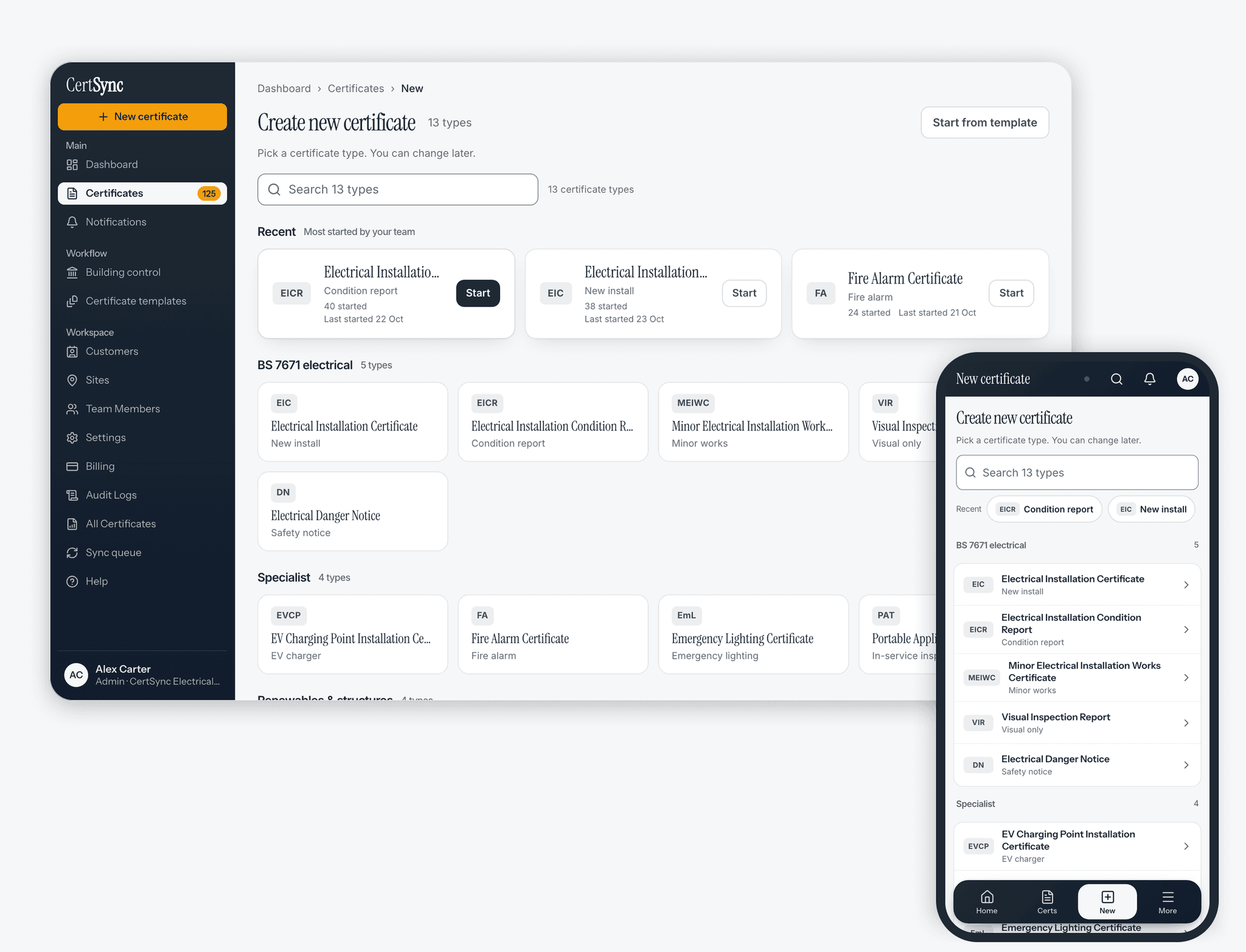
Pick the certificate
Choose from 13 types. Pick a customer and site, and the details from earlier jobs are already filled in.
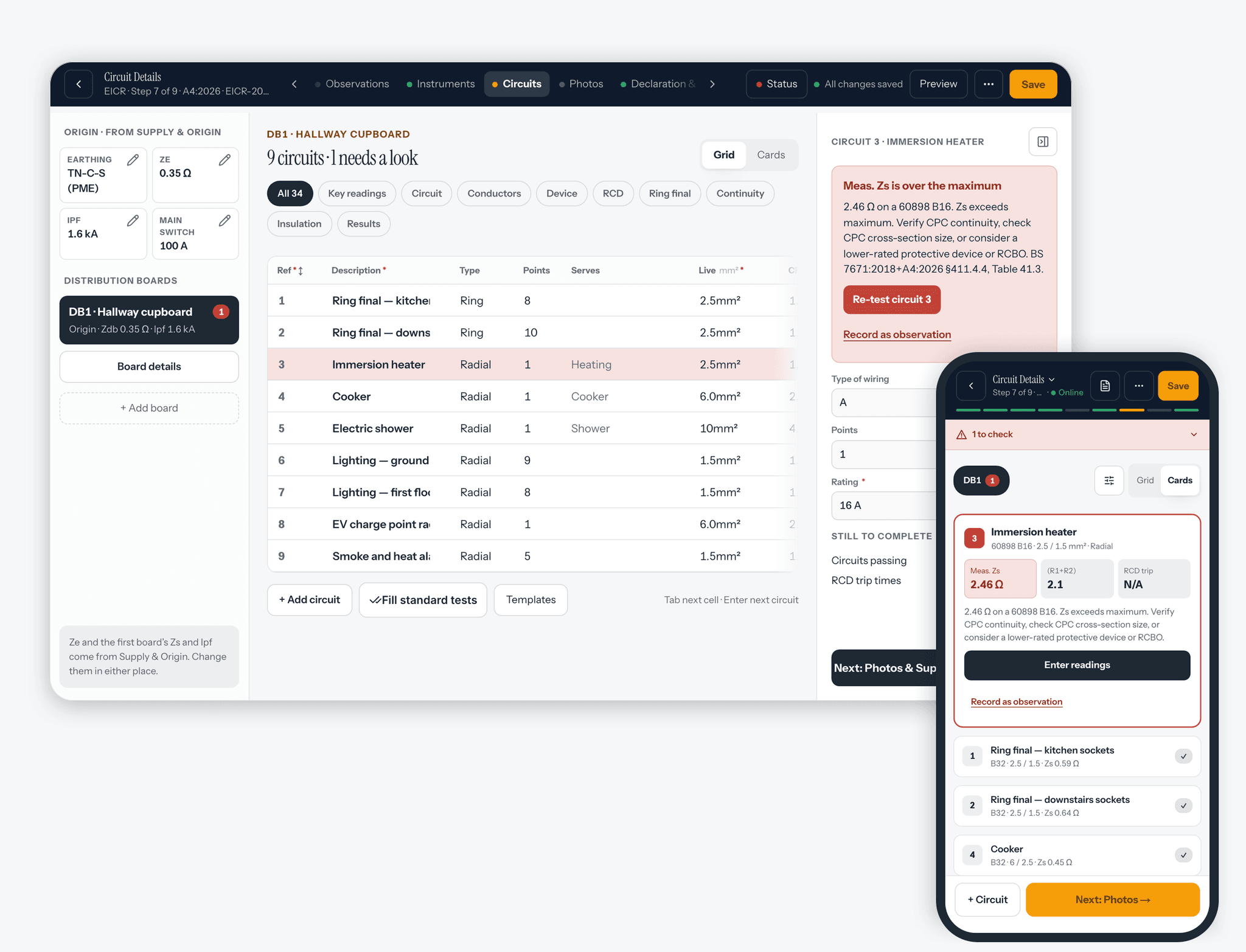
Fill it in on site
On EIC and EICR, circuit figures are checked against BS 7671 as you type. Press Preview at any point to see the finished PDF, and scroll and zoom it.
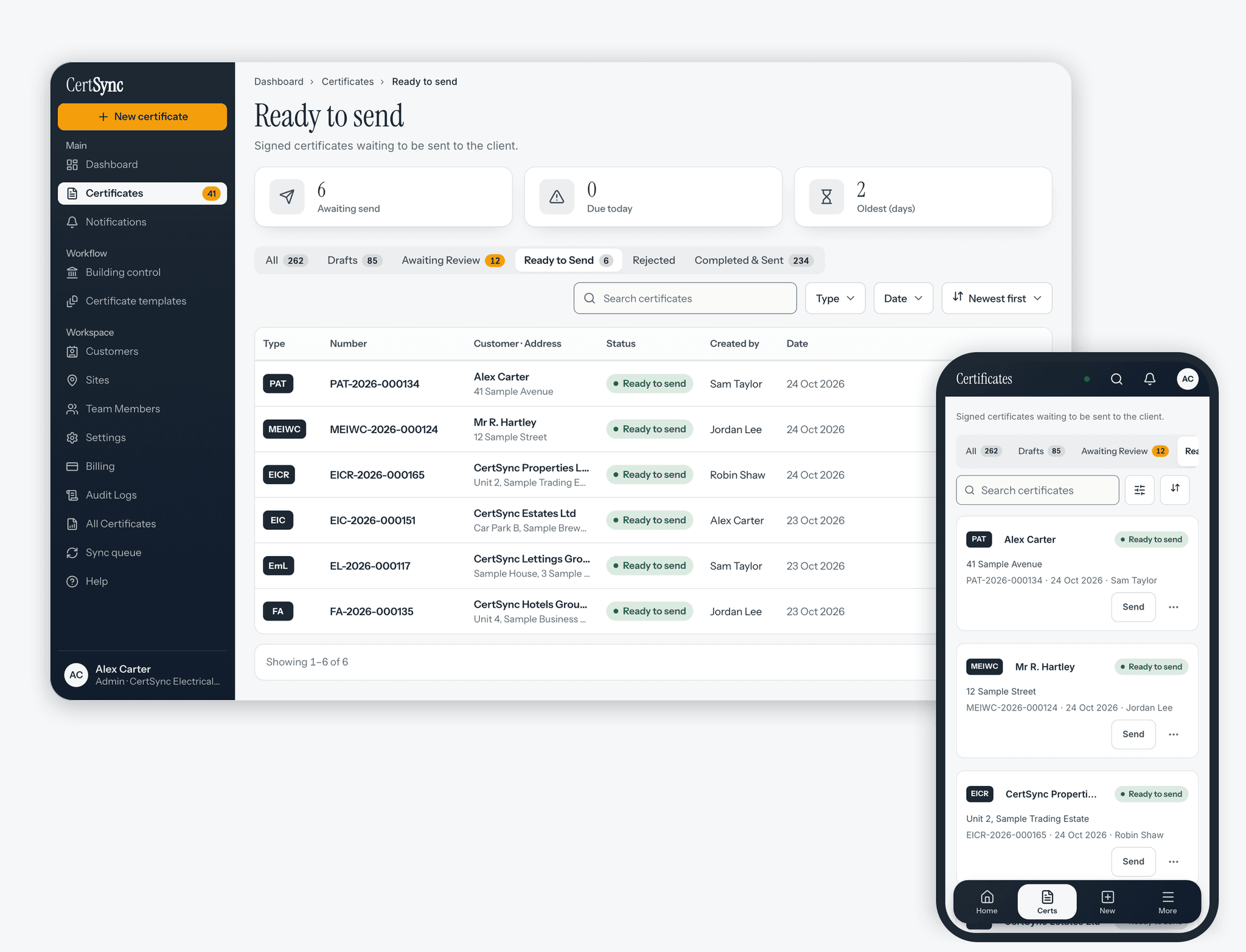
Review, sign and send
A supervisor can review it first. Sign on screen and the PDF is emailed to your customer.


Live circuit checking (EIC & EICR)
Catch the fail before you leave the field.
On EIC and EICR circuits, your figures check against BS 7671:2018+A4:2026 as you type. Measured Zs out of range for the device rating? You'll know before you leave the field — with a red/amber/green flag and the regulation reference. Observation codes C1, C2, C3 and FI built in.
Up to date with BS 7671:2018+A4:2026.
Validation assists the competent person; it does not replace professional judgement.
- 13
- certificate types
- 4
- observation codes: C1, C2, C3 and FI
Works offline
Can I use CertSync with no signal?
Yes. In a basement, a loft or a plant room with no bars, you can create and fill in certificates, and they sync when you reconnect. Signing, approving and sending a certificate are completed once you are back on signal. Get the app for iPhone and iPad from the App Store, or for Android from Google Play.
- Certificates download to your device automatically; storage decides how many (250 MB by default, change it in Settings → Storage)
- Pin a signed certificate to keep it on the device
- Drafts auto-save locally while you work
- Background sync as soon as you reconnect
Photos taken without a signal upload on their own when you reconnect.
Built for the phone in your van
- The app keeps recent work and drafts on the phone
- Camera photos go straight into the certificate
- Fingerprint lock, and a notification when a certificate needs you



- No signal · saving on this device
- Back online · synced
Four roles, one flow
Installers draft. Supervisors sign. Clients receive.
Four roles: Installer, Supervisor, Office, Admin. Installers create drafts and submit for review. Supervisors review, approve, return with comments, or sign. Office seats read, export and send — never sign. Admins manage the team and the bill. Invite a colleague into a live draft and edit it together. Edits to different sections are combined, and a save that would overwrite a colleague's newer change is stopped and shown to you instead.
How teams work

Cross-certificate memory
Customers, sites and certificate history in one place.
Every customer keeps their sites and every certificate raised against them in one place. Open a customer to see their properties and the full history of EICs, EICRs and every other type at each address — so the next job starts with the details already filled in.
- Print a QR sticker for a certificate. Scanning it opens a CertSync page; after the certificate is sent, anyone with the property postcode can see its details.
- Signed certificates are locked. To correct one, you issue a new certificate that replaces it.
- Convert a signed certificate into another type as a new draft (EIC ↔ EICR, Minor Works → EIC, visual inspection → EICR and more).
- Press Preview at any point to see the finished PDF in a pop-up you can scroll and zoom.
- Select certificates and download their PDFs as one ZIP file.
- Pick ready-made observations on EV charge point, fire alarm, visual inspection, solar PV, battery, lightning protection and emergency lighting certificates, not just the EICR, then edit the wording and code to suit the job.

PRO
Projects, for teams that run jobs.
Everything in CORE, plus the job around the certificate: projects, a team schedule and per-day staffing. The same 13 types, not more of them.
- Projects with their certificates in one place
- A week or month schedule of who is on which job
- Per-day staffing
Pricing
From £15/month. First month free.
Two plans, every certificate type in both.
CORE
For issuing certificates, solo or as a team.
£15/mo per company · +£5/user (2–10) · +£3/user (11+)
- All 13 UK electrical & renewables certificate types
- Live BS 7671 circuit checking on EIC and EICR
- Offline working on site
- The Installer → Supervisor → Client approval workflow for your whole team
Unlimited certificates. All 13 types. Cloud storage for the duration of your subscription, with a 90-day grace period on cancellation. Team seats from £5 per user per month.
EIC · EICR · MEIWC · VIR + 9 more · Cloud storage while you subscribe
CertSync is not currently VAT registered. The price you see is the total you pay.
PRO+ Projects
Everything in CORE, plus Projects.
£25/mo per company · +£8/user (2–10) · +£5/user (11+)
Everything in CORE, plus projects, a team schedule and per-day staffing. The same 13 certificate types.
The base price covers you. Each teammate is a seat at the seat rate, bought before you invite them. Teams of more than 20, talk to us. Full prices are on the pricing page.
What is CertSync?
CertSync is certificate software for UK electricians. It covers 13 certificate types, including EIC, EICR and MEIWC, and checks circuit test figures against BS 7671 as you type on EIC and EICR. Certificates are signed digitally and emailed to your customer. From £15/month, and the first month is free.
Which certificates can I issue with CertSync?
All 13: EIC, EICR, MEIWC, VIR, Danger Notice, EVCP, Emergency Lighting, Fire Alarm, PAT, Solar PV, Battery/EESS, Lightning Protection and BS 7909 Temporary Events. Every plan includes every type.
Can I use CertSync with no signal?
Yes. You can create and fill in certificates with no signal, drafts save on the device as you type, and photos you take are queued. Everything syncs when you reconnect. Signing, approving and sending a certificate are completed once you are back on signal.
How much does CertSync cost?
From £15/month for the first user, and each extra person is a paid seat. The first month is free for teams of up to 4. CertSync is not currently VAT registered, so the price you see is the total you pay. Full prices are on the pricing page.
Is CertSync connected to NICEIC or NAPIT?
No. CertSync is independent software and is not endorsed by or affiliated with NICEIC, NAPIT, the IET, BSI or any scheme body. You enter your own scheme membership and registration number on each certificate.
Read more
Guides and the detail.
Guides for electricians
- How to fill in an EICR: a step-by-step guide for electricians
- Part P and when electrical work must be notified
- Who can sign an electrical certificate
- Which certificate do you need? All 13 explained
- Landlord electrical safety rules — the EICR 5-year rule
- EICR observation codes explained: C1, C2, C3 and FI
- How to check an EICR or electrical certificate is genuine
- BS 7671:2018+A4:2026 — what changes for electricians
- How to fill in an EIC: a step-by-step guide for electricians
- Fire alarm certificates and BS 5839: domestic vs non-domestic explained
- Emergency lighting certificates and BS 5266: what needs one, and what doesn't
- EV charge point certificates and the IET Code of Practice
- Solar PV commissioning certificates: what the record has to show
- Battery storage (EESS) commissioning certificates explained
- Lightning protection test and inspection reports explained
- BS 7909 certificates for temporary electrical systems at events
Your first month is free
Put it through a real job, on us.
Create a real EIC — every field, every circuit, every test result — then save, sign and send it to a client. Your first month is free, so you can put CertSync through a full job before you commit.
First month free · Card required · Cancel any time
Built for UK electricians.